> ## Documentation Index
> Fetch the complete documentation index at: https://docs.erstan.com/llms.txt
> Use this file to discover all available pages before exploring further.
# Giving agents tools, skills & connections
> Attach the skills, tools, and connectors an agent needs to do real NetSuite finance work — with write approvals on by default.
An agent is only as capable as what you give it. Skills teach it *how* to do a job the expert way, tools and connectors let it *act* in NetSuite and other systems, and write approvals keep you in control of every change.
 ## Skills vs. tools vs. connectors
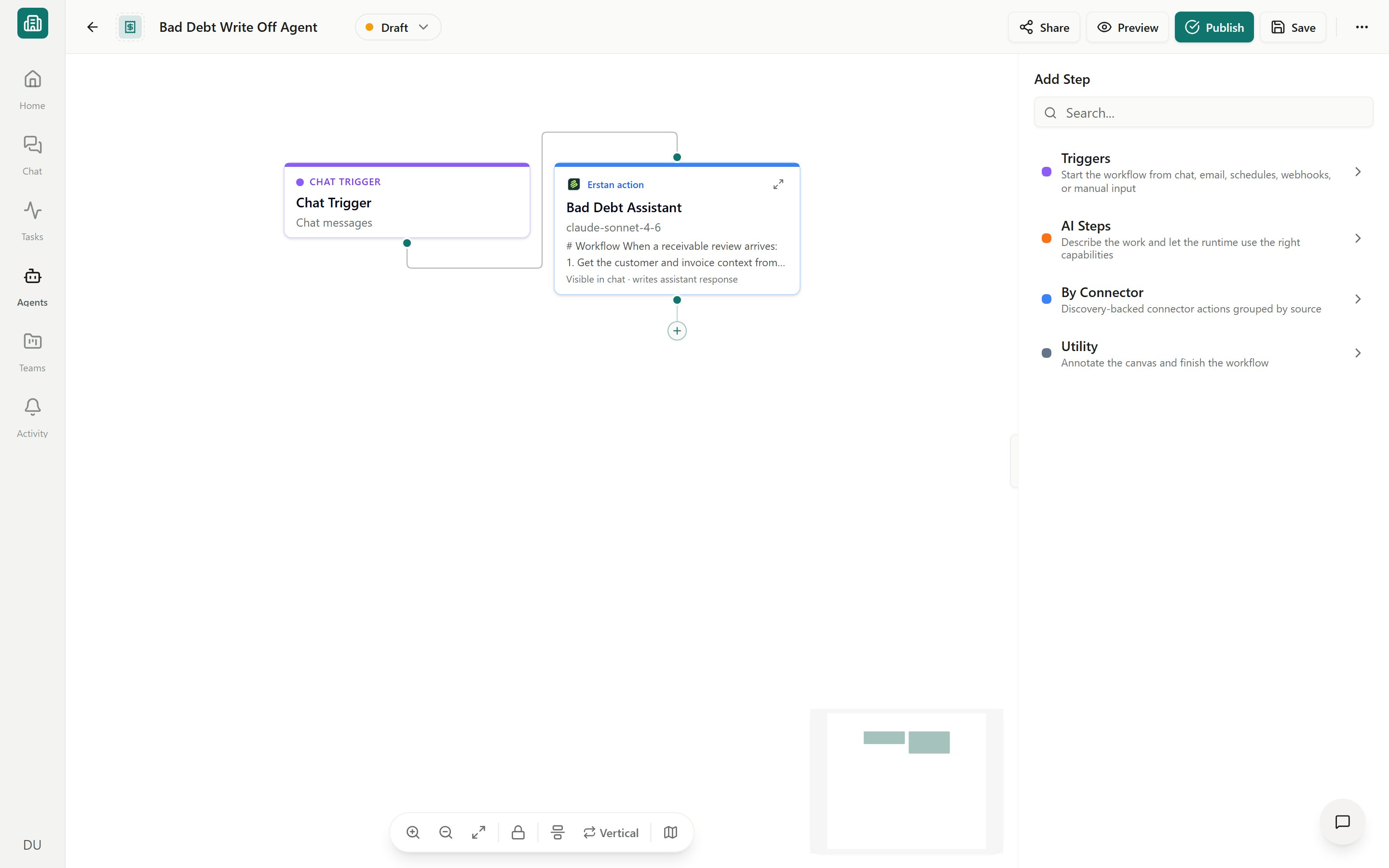
These three work together but do different things. Set them on an agent's steps in the [visual builder](/agents/builder).
| | What it is | What it does | Where it comes from |
| ------------- | --------------------------------------------------------------------------------- | -------------------------------------------------------------------------------------------------- | ---------------------------------------------------------------------------------------- |
| **Skill** | A reusable package of instructions (a `SKILL.md` plus optional files and actions) | Guides the agent through a task the same expert way every time — guidance, not a guaranteed action | The [Skills library](/skills/overview); must be **Published** (shown as **Agent ready**) |
| **Tool** | A deterministic action exposed by a connector | Does one concrete thing — read a record, run a SuiteQL query, create a vendor bill | A **Connector** (NetSuite, Slack, built-in Erstan tools) |
| **Connector** | A link to an external system | Provides the tools and the authorization behind them | The [Connectors](/connectors/overview) page |
Think of a skill as *judgment* (when and how to do something) and a tool as a *capability* (the actual action). A good agent usually needs both — a skill that knows your AR collections process, plus NetSuite tools to read invoices and draft outreach.
## Adding skills to an agent
Skills give an agent repeatable know-how — your dunning policy, how you categorize vendor bills, the exact SuiteQL pattern your team trusts.
From the [Agents library](/agents/overview), open the agent you want to edit. Select the AI step (for example **AI Respond** or **AI Agent**) that should use the skill.
In the inspector, add the skill from your workspace library. Only **Published** skills (marked **Agent ready**) appear — a Draft skill is not usable by an agent yet.
**Save** the agent, then **Preview** a run to confirm the agent follows the skill's guidance before you publish.
If the skill you want is still a Draft, publish it first. See [Publishing, sharing & lifecycle](/skills/publish-share). To build a new one, see [Creating and editing skills](/skills/create-edit).
## Selecting connector tools
Tools are the actions an agent can actually take. They come from your connectors:
* **NetSuite** — read records, run read-only SuiteQL, and (with approval) create or update records such as invoices, vendor bills, and customer messages.
* **Built-in Erstan tools** — utility actions that need no setup.
* **Other connectors** — Slack, MCP servers, and more (see [Connectors overview](/connectors/overview)).
In the builder, connector actions live under the **By Connector** node category. Add an action step, then pick the connector and the specific tool it should run. For the full catalog of step types, see the [Step reference](/agents/step-reference).
For the source-based tool catalog, see [Tools overview](/tools/overview), [Tools by Erstan](/tools/by-erstan), and [Tools by connector](/tools/by-connector).
### The "Connection required" banner
A step can only run if its connector is connected and authorized. If something is missing, the agent shows an amber **Connection required** banner, and the run is blocked until you resolve it.
An owner or admin sets up the shared workspace connection once. Open [Connectors](/connectors/overview) and connect the system the step needs.
NetSuite uses **per-user authorization** — each member authorizes their own NetSuite user and role before agents can act as them. Authorize from the connector's Setup tab, or from the **Authorization Required** card in chat. See [Authorizing your NetSuite user](/connectors/netsuite-authorize).
Scheduled and form-triggered agents run under a specific user. If that identity isn't configured or consented, the builder flags **Trigger setup** and publishing is blocked. See [Preview, publish & versions](/agents/publish-lifecycle).
## Write-capable tools need approval
Reading data is safe. Writing to NetSuite — creating or updating records — changes your books, so Erstan gates it.
Every NetSuite tool has a **write policy** an owner or admin sets on the connector's **Tools** tab:
| Policy | Behavior |
| -------------------- | ------------------------------------------------------------------------------------------------------------------------------- |
| **Allow** | The agent can run the action automatically. |
| **Require approval** | The agent pauses for a person to **Run action** or **Don't run** before the write. This is the default for write-capable tools. |
| **Deny** | The agent can't use the tool at all. |
Write-capable NetSuite tools **require approval by default**. When an agent reaches one, it pauses and shows an approval card with a before/after preview — nothing is written until you approve. Loosen this only when you fully trust the action. Manage write policy per tool on the [Managing NetSuite: tools & write policy](/connectors/netsuite-manage) page, and review how approvals work in [Approving and rejecting AI actions](/chat/approvals).
You can add an explicit **AI Approval** step in the builder to force a human check at a specific point in a run, even for actions that would otherwise be allowed. See the [Step reference](/agents/step-reference).
## Next steps
Add steps, attach skills and tools, and resolve connection warnings.
Every step type, including By Connector actions and AI Approval.
Set write policy (Allow / Require approval / Deny) per tool.
How per-user authorization and approvals keep your data safe.
## Skills vs. tools vs. connectors
These three work together but do different things. Set them on an agent's steps in the [visual builder](/agents/builder).
| | What it is | What it does | Where it comes from |
| ------------- | --------------------------------------------------------------------------------- | -------------------------------------------------------------------------------------------------- | ---------------------------------------------------------------------------------------- |
| **Skill** | A reusable package of instructions (a `SKILL.md` plus optional files and actions) | Guides the agent through a task the same expert way every time — guidance, not a guaranteed action | The [Skills library](/skills/overview); must be **Published** (shown as **Agent ready**) |
| **Tool** | A deterministic action exposed by a connector | Does one concrete thing — read a record, run a SuiteQL query, create a vendor bill | A **Connector** (NetSuite, Slack, built-in Erstan tools) |
| **Connector** | A link to an external system | Provides the tools and the authorization behind them | The [Connectors](/connectors/overview) page |
Think of a skill as *judgment* (when and how to do something) and a tool as a *capability* (the actual action). A good agent usually needs both — a skill that knows your AR collections process, plus NetSuite tools to read invoices and draft outreach.
## Adding skills to an agent
Skills give an agent repeatable know-how — your dunning policy, how you categorize vendor bills, the exact SuiteQL pattern your team trusts.
From the [Agents library](/agents/overview), open the agent you want to edit. Select the AI step (for example **AI Respond** or **AI Agent**) that should use the skill.
In the inspector, add the skill from your workspace library. Only **Published** skills (marked **Agent ready**) appear — a Draft skill is not usable by an agent yet.
**Save** the agent, then **Preview** a run to confirm the agent follows the skill's guidance before you publish.
If the skill you want is still a Draft, publish it first. See [Publishing, sharing & lifecycle](/skills/publish-share). To build a new one, see [Creating and editing skills](/skills/create-edit).
## Selecting connector tools
Tools are the actions an agent can actually take. They come from your connectors:
* **NetSuite** — read records, run read-only SuiteQL, and (with approval) create or update records such as invoices, vendor bills, and customer messages.
* **Built-in Erstan tools** — utility actions that need no setup.
* **Other connectors** — Slack, MCP servers, and more (see [Connectors overview](/connectors/overview)).
In the builder, connector actions live under the **By Connector** node category. Add an action step, then pick the connector and the specific tool it should run. For the full catalog of step types, see the [Step reference](/agents/step-reference).
For the source-based tool catalog, see [Tools overview](/tools/overview), [Tools by Erstan](/tools/by-erstan), and [Tools by connector](/tools/by-connector).
### The "Connection required" banner
A step can only run if its connector is connected and authorized. If something is missing, the agent shows an amber **Connection required** banner, and the run is blocked until you resolve it.
An owner or admin sets up the shared workspace connection once. Open [Connectors](/connectors/overview) and connect the system the step needs.
NetSuite uses **per-user authorization** — each member authorizes their own NetSuite user and role before agents can act as them. Authorize from the connector's Setup tab, or from the **Authorization Required** card in chat. See [Authorizing your NetSuite user](/connectors/netsuite-authorize).
Scheduled and form-triggered agents run under a specific user. If that identity isn't configured or consented, the builder flags **Trigger setup** and publishing is blocked. See [Preview, publish & versions](/agents/publish-lifecycle).
## Write-capable tools need approval
Reading data is safe. Writing to NetSuite — creating or updating records — changes your books, so Erstan gates it.
Every NetSuite tool has a **write policy** an owner or admin sets on the connector's **Tools** tab:
| Policy | Behavior |
| -------------------- | ------------------------------------------------------------------------------------------------------------------------------- |
| **Allow** | The agent can run the action automatically. |
| **Require approval** | The agent pauses for a person to **Run action** or **Don't run** before the write. This is the default for write-capable tools. |
| **Deny** | The agent can't use the tool at all. |
Write-capable NetSuite tools **require approval by default**. When an agent reaches one, it pauses and shows an approval card with a before/after preview — nothing is written until you approve. Loosen this only when you fully trust the action. Manage write policy per tool on the [Managing NetSuite: tools & write policy](/connectors/netsuite-manage) page, and review how approvals work in [Approving and rejecting AI actions](/chat/approvals).
You can add an explicit **AI Approval** step in the builder to force a human check at a specific point in a run, even for actions that would otherwise be allowed. See the [Step reference](/agents/step-reference).
## Next steps
Add steps, attach skills and tools, and resolve connection warnings.
Every step type, including By Connector actions and AI Approval.
Set write policy (Allow / Require approval / Deny) per tool.
How per-user authorization and approvals keep your data safe.