> ## Documentation Index
> Fetch the complete documentation index at: https://docs.erstan.com/llms.txt
> Use this file to discover all available pages before exploring further.
# Welcome to Erstan
> Erstan is an AI agent platform for NetSuite finance and operations — chat, build agents, and act on your data with approvals.
Erstan puts AI agents to work on your NetSuite finance operations — drafting, analyzing, and acting on your data, with you in control of every change. It is built for the people who run finance and operations on NetSuite: AR and AP clerks, controllers, accountants, and the workspace admins who set them up.
 ## The big idea
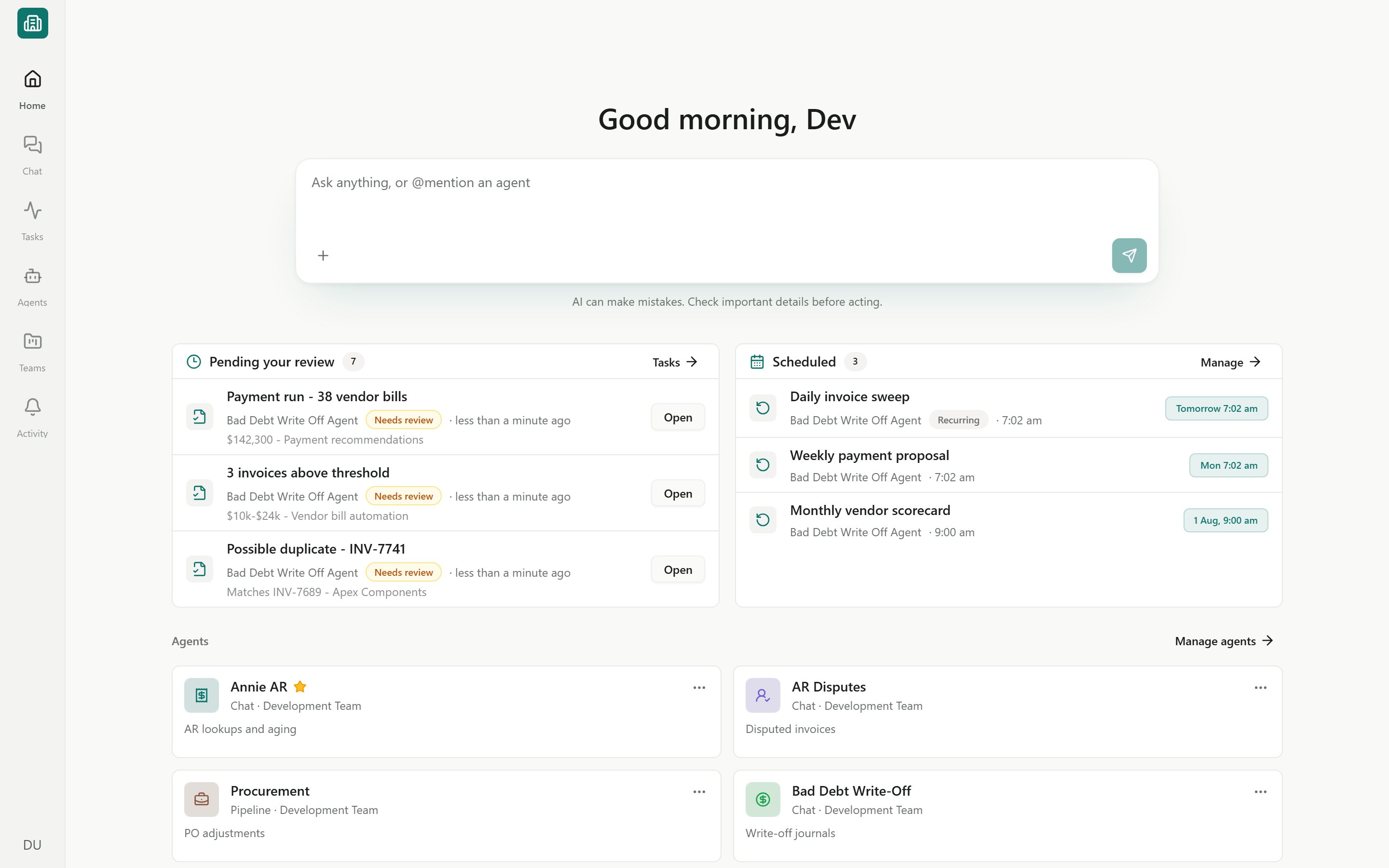
Erstan connects to your own NetSuite account and lets AI agents read and act on your data — overdue invoices, AR aging, vendor bills, sales orders, SuiteQL results, and more. Agents draft and propose, but anything that writes back to NetSuite pauses for you first.
Agents act with **your** NetSuite role and permissions through **per-user authorization**, and every write follows a **write policy** you control. You approve each change before it runs — nothing happens to your ERP behind your back.
## Where to start
Connect NetSuite, open Chat, and run your first agent in a few minutes.
The mental model: workspaces, teams, agents, skills, tasks, and approvals.
Link your NetSuite account so agents can read and act on your data.
Meet the three agent shapes — Assistants, Workforces, and Automations.
Add ready-made agents, skills, and bundles for AP, AR, Close, and Reporting.
Run your published agents programmatically from your own systems.
## What you can do with Erstan
* **Chat with your data** — ask "Show me overdue invoices over \$10,000" or "Summarize AR aging by customer" and get answers grounded in your NetSuite account.
* **Draft outreach and documents** — have an agent draft a collections email or a reporting memo, then review it before anything is sent.
* **Build agents that act** — create an [Assistant, Workforce, or Automation](/agents/overview) that reconciles, triages vendor bills, or flags exceptions.
* **Install ready-made help** — add an AR collections or accounts payable agent from the [Marketplace](/marketplace/overview) instead of building from scratch.
* **Intake documents** — OCR a quote or bill and turn it into structured NetSuite data (see the [OCR quote intake](/developers/netsuite-ocr-quote-intake) example).
* **Query with SuiteQL** — let Erstan write and run read-only [SuiteQL](/playbooks/reporting-suiteql) and open the results in [Canvas](/chat/canvas).
* **Review and approve** — every agent run becomes a [task](/tasks/overview) that moves through Queued → In Progress → Needs Review → Complete, with [approvals](/chat/approvals) on any write.
## How the pieces fit
A [Connector](/connectors/overview) gives agents access to a system like NetSuite. An [Agent](/agents/overview) does the work using [Skills](/skills/overview) and tools. Its output shows up as [Tasks](/tasks/overview) you can track, and any change to NetSuite waits for your [approval](/chat/approvals). [Teams](/teams/overview) keep each group's agents, content, and tasks together inside your [workspace](/admin/workspaces-people).
Erstan is in **Beta** and access is waitlist-gated. Some surfaces are limited to **Owners and admins** — those are called out where they appear.
## Next steps
Go from zero to your first agent run.
Find your way around the sidebar, Home, and workspace switcher.
Ask Erstan to find, analyze, and act on your NetSuite data.
See how Erstan keeps you in control of every change.
## The big idea
Erstan connects to your own NetSuite account and lets AI agents read and act on your data — overdue invoices, AR aging, vendor bills, sales orders, SuiteQL results, and more. Agents draft and propose, but anything that writes back to NetSuite pauses for you first.
Agents act with **your** NetSuite role and permissions through **per-user authorization**, and every write follows a **write policy** you control. You approve each change before it runs — nothing happens to your ERP behind your back.
## Where to start
Connect NetSuite, open Chat, and run your first agent in a few minutes.
The mental model: workspaces, teams, agents, skills, tasks, and approvals.
Link your NetSuite account so agents can read and act on your data.
Meet the three agent shapes — Assistants, Workforces, and Automations.
Add ready-made agents, skills, and bundles for AP, AR, Close, and Reporting.
Run your published agents programmatically from your own systems.
## What you can do with Erstan
* **Chat with your data** — ask "Show me overdue invoices over \$10,000" or "Summarize AR aging by customer" and get answers grounded in your NetSuite account.
* **Draft outreach and documents** — have an agent draft a collections email or a reporting memo, then review it before anything is sent.
* **Build agents that act** — create an [Assistant, Workforce, or Automation](/agents/overview) that reconciles, triages vendor bills, or flags exceptions.
* **Install ready-made help** — add an AR collections or accounts payable agent from the [Marketplace](/marketplace/overview) instead of building from scratch.
* **Intake documents** — OCR a quote or bill and turn it into structured NetSuite data (see the [OCR quote intake](/developers/netsuite-ocr-quote-intake) example).
* **Query with SuiteQL** — let Erstan write and run read-only [SuiteQL](/playbooks/reporting-suiteql) and open the results in [Canvas](/chat/canvas).
* **Review and approve** — every agent run becomes a [task](/tasks/overview) that moves through Queued → In Progress → Needs Review → Complete, with [approvals](/chat/approvals) on any write.
## How the pieces fit
A [Connector](/connectors/overview) gives agents access to a system like NetSuite. An [Agent](/agents/overview) does the work using [Skills](/skills/overview) and tools. Its output shows up as [Tasks](/tasks/overview) you can track, and any change to NetSuite waits for your [approval](/chat/approvals). [Teams](/teams/overview) keep each group's agents, content, and tasks together inside your [workspace](/admin/workspaces-people).
Erstan is in **Beta** and access is waitlist-gated. Some surfaces are limited to **Owners and admins** — those are called out where they appear.
## Next steps
Go from zero to your first agent run.
Find your way around the sidebar, Home, and workspace switcher.
Ask Erstan to find, analyze, and act on your NetSuite data.
See how Erstan keeps you in control of every change.