> ## Documentation Index
> Fetch the complete documentation index at: https://docs.erstan.com/llms.txt
> Use this file to discover all available pages before exploring further.
# Marketplace overview
> Discover and add ready-made agents and teams built for NetSuite work.
The Marketplace, shown as **Solution Library** in Erstan, is where you add ready-made Agents and Teams instead of building them from scratch. Listings focus on useful outcomes, required access, and the approvals that keep you in control.
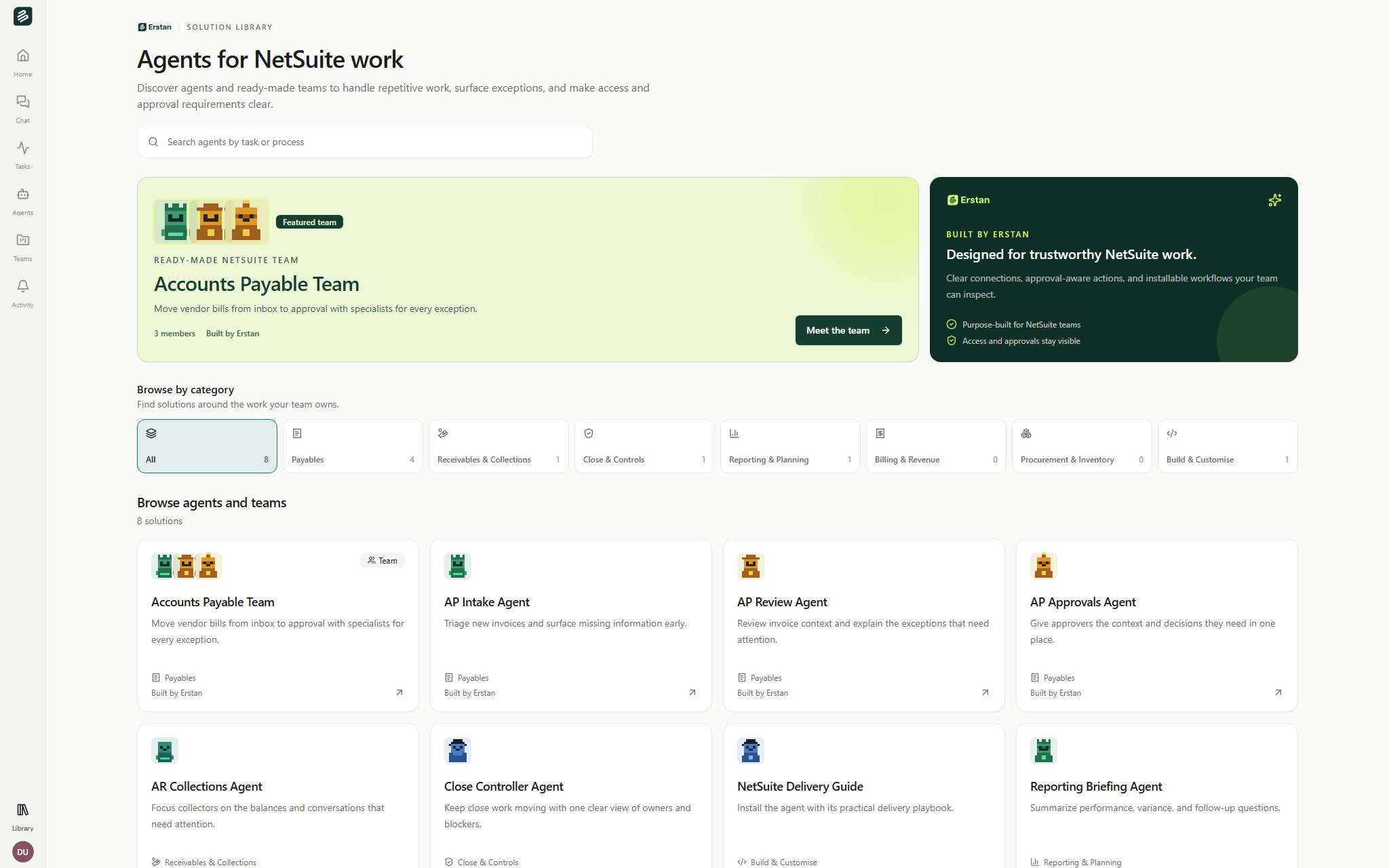 Open **Solution Library** from the sidebar. Search by task or process, choose a business category, or browse the combined Agent and Team grid.
## What you can add
Ready-made [Agents](/agents/overview) for focused work. Some work with you in chat; others run a defined automation. Open a listing to review its capabilities, access, example requests, and workflow.
A coordinated set of Agents installed together for an end-to-end process. A Team also brings the capabilities, example requests, templates, and connection requirements its members need.
Skills and prompts still power installed solutions, but they are presented as **Capabilities** and **Example requests** inside Agent and Team details rather than as separate Marketplace products. You can continue to manage them in their dedicated workspace libraries.
## Browse by business category
The storefront groups the detailed catalog areas into seven straightforward categories:
| Category | Includes |
| ----------------------------- | ----------------------------------------- |
| **Payables** | Accounts Payable |
| **Receivables & Collections** | Accounts Receivable and Collections |
| **Close & Controls** | Month-end Close and Audit & Controls |
| **Reporting & Planning** | Reporting & Analytics and Treasury & Cash |
| **Billing & Revenue** | Billing and Sales & CRM |
| **Procurement & Inventory** | Procurement and Inventory |
| **Build & Customise** | Build on NetSuite |
Choose **All** to return to the complete catalog. Items without a mapped category remain available under All.
## Find the right solution
Search names, outcomes, tags, and business areas. The result count updates as you type.
Select one category to focus the combined Agent and Team grid. Search and category filters work together.
Clear search and category to bring back the featured Team and Erstan assurance panel.
There are no separate type, connector, model, partner, pricing, or sort controls. Required services and access policies appear on each listing detail, where they can be assessed in context.
## Built by Erstan
Erstan-authored listings carry a **Built by Erstan** byline. The Marketplace highlights Erstan as the official builder and explains the access and approval posture of each solution.
When community publishing is enabled for a workspace, an approved community listing keeps its real builder name. Publisher attribution is informational and does not link to a partner directory.
## Connections and write safety
Open a listing's **Capabilities & access** section to see required connections and the clearest available safety posture:
* **Read-only** means the declared tools only read data.
* **Writes require approval** means write-capable actions pause for review.
* **Workspace tool policies apply** means the listing does not declare enough information to infer a stricter posture.
Agents use each member's own [NetSuite authorization](/connectors/netsuite-authorize) and role permissions. Installing a solution never grants a new NetSuite role or bypasses [write approvals](/chat/approvals).
## Next steps
Review an Agent's outcomes, capabilities, access, and example requests before adding it.
See what a Team installs and how its members work together.
Create, publish, and manage the capabilities available to your Agents.
Learn how per-user authorization and approvals protect NetSuite.
Open **Solution Library** from the sidebar. Search by task or process, choose a business category, or browse the combined Agent and Team grid.
## What you can add
Ready-made [Agents](/agents/overview) for focused work. Some work with you in chat; others run a defined automation. Open a listing to review its capabilities, access, example requests, and workflow.
A coordinated set of Agents installed together for an end-to-end process. A Team also brings the capabilities, example requests, templates, and connection requirements its members need.
Skills and prompts still power installed solutions, but they are presented as **Capabilities** and **Example requests** inside Agent and Team details rather than as separate Marketplace products. You can continue to manage them in their dedicated workspace libraries.
## Browse by business category
The storefront groups the detailed catalog areas into seven straightforward categories:
| Category | Includes |
| ----------------------------- | ----------------------------------------- |
| **Payables** | Accounts Payable |
| **Receivables & Collections** | Accounts Receivable and Collections |
| **Close & Controls** | Month-end Close and Audit & Controls |
| **Reporting & Planning** | Reporting & Analytics and Treasury & Cash |
| **Billing & Revenue** | Billing and Sales & CRM |
| **Procurement & Inventory** | Procurement and Inventory |
| **Build & Customise** | Build on NetSuite |
Choose **All** to return to the complete catalog. Items without a mapped category remain available under All.
## Find the right solution
Search names, outcomes, tags, and business areas. The result count updates as you type.
Select one category to focus the combined Agent and Team grid. Search and category filters work together.
Clear search and category to bring back the featured Team and Erstan assurance panel.
There are no separate type, connector, model, partner, pricing, or sort controls. Required services and access policies appear on each listing detail, where they can be assessed in context.
## Built by Erstan
Erstan-authored listings carry a **Built by Erstan** byline. The Marketplace highlights Erstan as the official builder and explains the access and approval posture of each solution.
When community publishing is enabled for a workspace, an approved community listing keeps its real builder name. Publisher attribution is informational and does not link to a partner directory.
## Connections and write safety
Open a listing's **Capabilities & access** section to see required connections and the clearest available safety posture:
* **Read-only** means the declared tools only read data.
* **Writes require approval** means write-capable actions pause for review.
* **Workspace tool policies apply** means the listing does not declare enough information to infer a stricter posture.
Agents use each member's own [NetSuite authorization](/connectors/netsuite-authorize) and role permissions. Installing a solution never grants a new NetSuite role or bypasses [write approvals](/chat/approvals).
## Next steps
Review an Agent's outcomes, capabilities, access, and example requests before adding it.
See what a Team installs and how its members work together.
Create, publish, and manage the capabilities available to your Agents.
Learn how per-user authorization and approvals protect NetSuite.