> ## Documentation Index
> Fetch the complete documentation index at: https://docs.erstan.com/llms.txt
> Use this file to discover all available pages before exploring further.
# Built-in skills
> Review the skills Erstan ships, and prioritize, disable, or replace them for your workspace.
Built-in skills are the ready-made instruction packages Erstan ships out of the box so agents handle common NetSuite finance tasks the same expert way every time. You can read them, control which ones agents reach for, and replace any of them with your own version.
 ## What built-in skills are
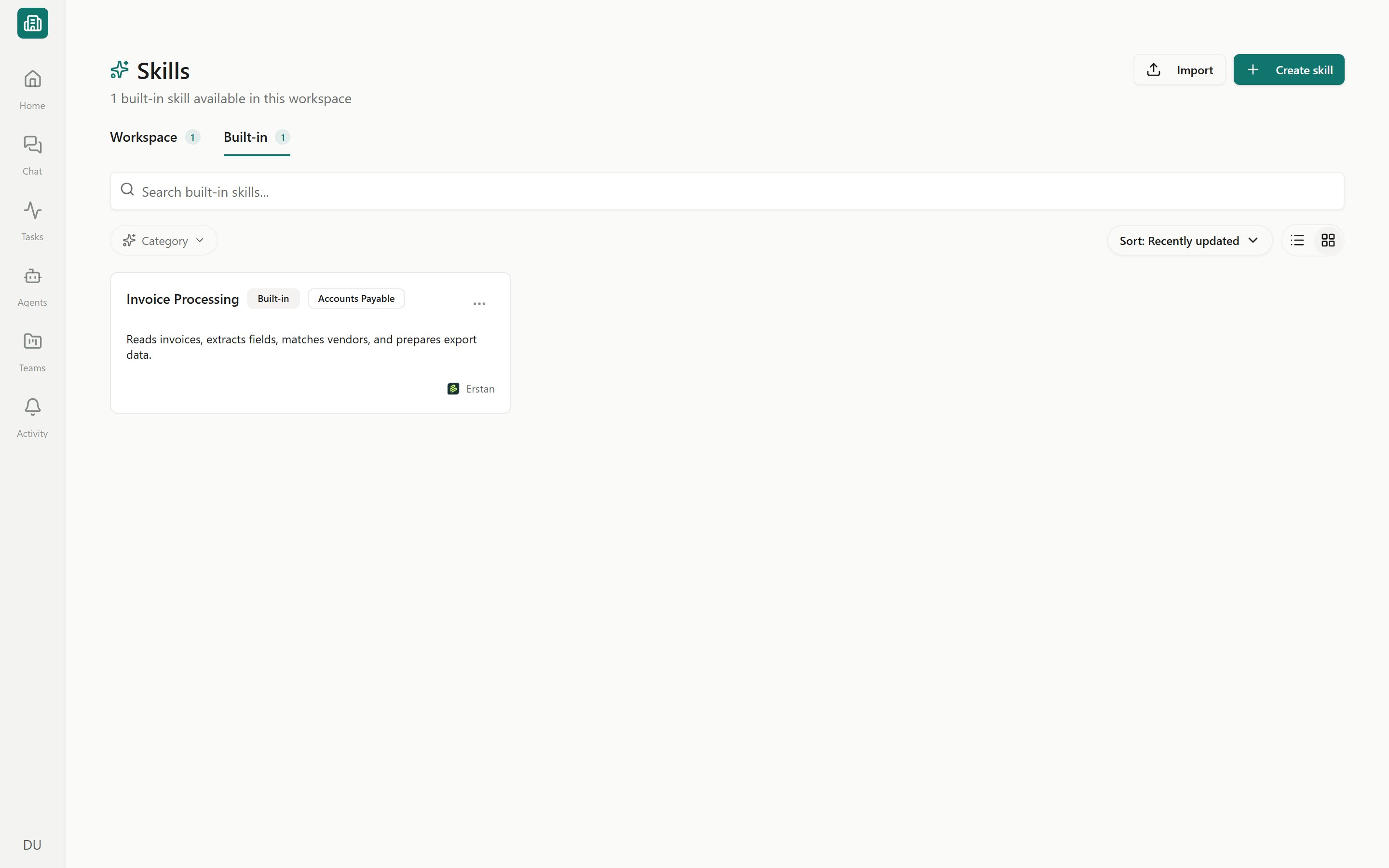
Open **Skills** from the sidebar and switch to the **Built-in** tab to see the skills Erstan provides. Each row carries a **Built-in** badge and shows its **Category** and **Source** (the publisher's logo and name).
Built-in skills are **read-only**. You can inspect everything about them, but you can't edit the files directly — to change one, you replace it with a custom copy (below). Everyone can browse the Built-in tab; the management actions are limited to workspace **Owners** and **Admins**.
Built-in skills appear only on the workspace-wide Skills page (`/skills`). The per-team Skills view hides the Built-in tab and shows just that team's workspace skills. For the bigger picture of how skills work, see [Skills overview](/skills/overview).
### Inspecting a built-in skill
Click any built-in skill to open its detail view:
* **Files** — the `SKILL.md` and any supporting files, shown read-only.
* **About** and **Capabilities** — what the skill does and what it can act on.
* **Recent usage** — where it has been used lately.
* **Version details** — inspect the skill's versions.
Non-admins see **View details** and **Version details** only; the state-changing actions are reserved for Owners and Admins.
## Built-in skill states
Every built-in skill is in one of four states. Owners and Admins change the state from the row's actions menu or the skill detail header.
| State | What it means |
| ---------------------- | ---------------------------------------------------------------------------------------- |
| **Active** | The default. The skill is available to agents as shipped. |
| **Prioritized** | Marked as preferred, so Erstan favors it when loading skills for a task. |
| **Disabled** | Turned off for the workspace; agents won't load it. |
| **Custom copy active** | Replaced by a workspace skill you created; agents use your copy instead of the built-in. |
## Owner and admin actions
Go to **Skills** in the sidebar and select the **Built-in** tab. Use the search box and **Category** filter to find a skill.
Choose **Prioritize** to mark a skill as preferred when agents load skills, or **Remove priority** to return it to the default pool. Use this to nudge agents toward the version of a task you trust most.
Choose **Disable** to take a skill out of circulation for the whole workspace, or **Enable** to bring it back. Disabling runs an impact check first (see below).
To tailor a built-in skill, duplicate it into an editable **Custom** workspace skill, change it, and publish. While your copy is published, the built-in shows **Custom copy active** and agents use your version. See [Creating and editing skills](/skills/create-edit) and [Publishing, sharing & lifecycle](/skills/publish-share).
To go back to the original, choose **Use built-in skill again**. Agents return to the shipped version and the state goes back to **Active**.
Disabling or replacing a built-in skill changes what every agent in the workspace can do — including agents that act on NetSuite. An agent that relied on a disabled skill may behave differently or skip a step. Review the impact check before you confirm, and re-test affected agents. Only published skills are loaded by agents, so a half-finished custom copy won't take over until you publish it.
## The impact check
Before you disable a built-in skill or activate a custom replacement, Erstan runs a **lifecycle impact check**. It scans where the skill is in use and shows you the impact so nothing breaks silently. It looks across:
* **Agents** that include the skill.
* **Chat threads** that have used it.
* **Channel bindings** that depend on it.
If draft agents reference the skill, you can **clean up draft usage** from the dialog before confirming. Review the list, resolve anything important, then confirm the change.
If an agent stops doing part of its job after you change a built-in skill, check this same impact information from the agent side under [Giving agents tools, skills & connections](/agents/tools-skills-connections).
## Frequently asked
No. Built-in skills are read-only. To change one, replace it with a custom copy: duplicate it into a workspace skill, edit, and publish. The built-in then shows **Custom copy active**.
Only workspace **Owners** and **Admins**. Members can view a built-in skill's details and version history but can't change its state. See [Workspaces and people](/admin/workspaces-people) for roles.
**Prioritize** keeps the original skill but tells Erstan to favor it when loading skills for a task. **Replace** swaps in your own custom version of the skill entirely.
Open the built-in skill and choose **Use built-in skill again**. Agents go back to the shipped version and the state returns to **Active**. Your custom copy stays in the workspace library.
## Next steps
How skills work and how agents use them.
Author a custom copy of a built-in skill.
Publish a skill so agents can use it.
Attach skills to the agents that need them.
## What built-in skills are
Open **Skills** from the sidebar and switch to the **Built-in** tab to see the skills Erstan provides. Each row carries a **Built-in** badge and shows its **Category** and **Source** (the publisher's logo and name).
Built-in skills are **read-only**. You can inspect everything about them, but you can't edit the files directly — to change one, you replace it with a custom copy (below). Everyone can browse the Built-in tab; the management actions are limited to workspace **Owners** and **Admins**.
Built-in skills appear only on the workspace-wide Skills page (`/skills`). The per-team Skills view hides the Built-in tab and shows just that team's workspace skills. For the bigger picture of how skills work, see [Skills overview](/skills/overview).
### Inspecting a built-in skill
Click any built-in skill to open its detail view:
* **Files** — the `SKILL.md` and any supporting files, shown read-only.
* **About** and **Capabilities** — what the skill does and what it can act on.
* **Recent usage** — where it has been used lately.
* **Version details** — inspect the skill's versions.
Non-admins see **View details** and **Version details** only; the state-changing actions are reserved for Owners and Admins.
## Built-in skill states
Every built-in skill is in one of four states. Owners and Admins change the state from the row's actions menu or the skill detail header.
| State | What it means |
| ---------------------- | ---------------------------------------------------------------------------------------- |
| **Active** | The default. The skill is available to agents as shipped. |
| **Prioritized** | Marked as preferred, so Erstan favors it when loading skills for a task. |
| **Disabled** | Turned off for the workspace; agents won't load it. |
| **Custom copy active** | Replaced by a workspace skill you created; agents use your copy instead of the built-in. |
## Owner and admin actions
Go to **Skills** in the sidebar and select the **Built-in** tab. Use the search box and **Category** filter to find a skill.
Choose **Prioritize** to mark a skill as preferred when agents load skills, or **Remove priority** to return it to the default pool. Use this to nudge agents toward the version of a task you trust most.
Choose **Disable** to take a skill out of circulation for the whole workspace, or **Enable** to bring it back. Disabling runs an impact check first (see below).
To tailor a built-in skill, duplicate it into an editable **Custom** workspace skill, change it, and publish. While your copy is published, the built-in shows **Custom copy active** and agents use your version. See [Creating and editing skills](/skills/create-edit) and [Publishing, sharing & lifecycle](/skills/publish-share).
To go back to the original, choose **Use built-in skill again**. Agents return to the shipped version and the state goes back to **Active**.
Disabling or replacing a built-in skill changes what every agent in the workspace can do — including agents that act on NetSuite. An agent that relied on a disabled skill may behave differently or skip a step. Review the impact check before you confirm, and re-test affected agents. Only published skills are loaded by agents, so a half-finished custom copy won't take over until you publish it.
## The impact check
Before you disable a built-in skill or activate a custom replacement, Erstan runs a **lifecycle impact check**. It scans where the skill is in use and shows you the impact so nothing breaks silently. It looks across:
* **Agents** that include the skill.
* **Chat threads** that have used it.
* **Channel bindings** that depend on it.
If draft agents reference the skill, you can **clean up draft usage** from the dialog before confirming. Review the list, resolve anything important, then confirm the change.
If an agent stops doing part of its job after you change a built-in skill, check this same impact information from the agent side under [Giving agents tools, skills & connections](/agents/tools-skills-connections).
## Frequently asked
No. Built-in skills are read-only. To change one, replace it with a custom copy: duplicate it into a workspace skill, edit, and publish. The built-in then shows **Custom copy active**.
Only workspace **Owners** and **Admins**. Members can view a built-in skill's details and version history but can't change its state. See [Workspaces and people](/admin/workspaces-people) for roles.
**Prioritize** keeps the original skill but tells Erstan to favor it when loading skills for a task. **Replace** swaps in your own custom version of the skill entirely.
Open the built-in skill and choose **Use built-in skill again**. Agents go back to the shipped version and the state returns to **Active**. Your custom copy stays in the workspace library.
## Next steps
How skills work and how agents use them.
Author a custom copy of a built-in skill.
Publish a skill so agents can use it.
Attach skills to the agents that need them.