> ## Documentation Index
> Fetch the complete documentation index at: https://docs.erstan.com/llms.txt
> Use this file to discover all available pages before exploring further.
# Creating and editing skills
> Author a skill by hand or with Skill Chat using the package editor, then save it as a draft.
A [skill](/skills/overview) is a reusable package of instructions — a `SKILL.md` file plus optional supporting files and actions — that agents load to do a task the same expert way every time. This page covers building one from scratch: naming it, working in the package editor, drafting with Skill Chat, and what has to be in place before you can publish.
 ## Start a new skill
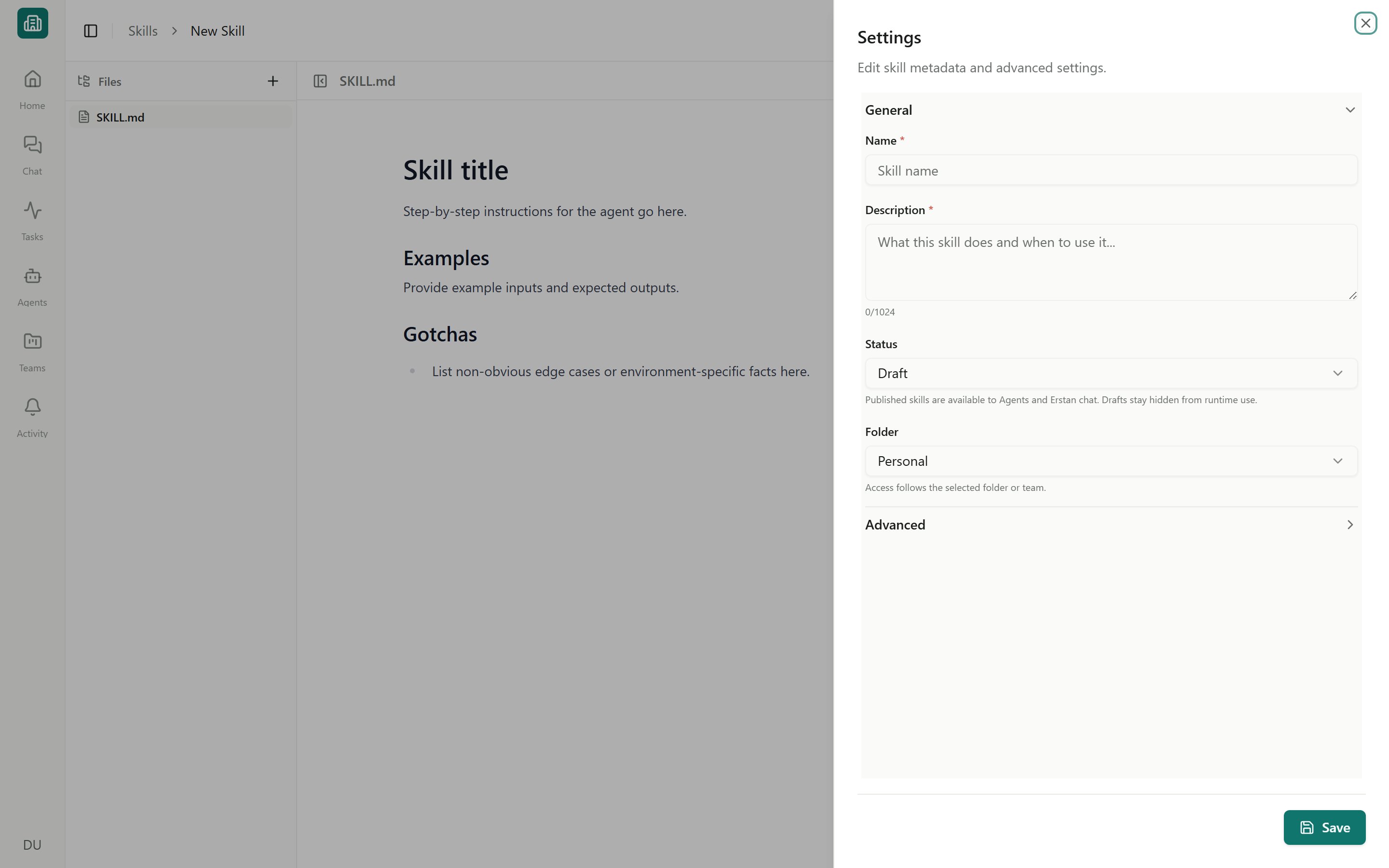
Open **Skills** from the sidebar and click **Create skill** (inside a team it reads **New skill**). The skill package editor opens with a starter `SKILL.md` ready to edit.
Enter a friendly **Display name** in the **Settings** panel. Erstan derives a lowercase, hyphenated **Skill name** for the package. You can adjust the Skill name before the first save; after creation it is immutable.
Add a **Description** that says, in one or two sentences, what the skill does and when an agent should use it. Agents read this to decide whether to load the skill, so make it concrete (for example, "Summarize AR aging by customer and flag balances over 90 days").
Pick a **Folder** — **Company**, **Personal**, or a specific **Team**. This sets where the skill lives and who it belongs to. A folder is **required**: a skill cannot be saved without one.
Flesh out the instructions in the editor (see below). Optionally set **License** and **Compatibility** in Settings.
Click **Save** to keep the skill as a **Draft**. It stays private to your edits until you [publish](/skills/publish-share) it.
**Display name**, **Skill name**, **Description**, and **Folder** are required to save.
## The package editor
The editor is a VS Code-style workspace with three areas.
The left panel lists the files in the skill. Every skill has a **SKILL.md** (it cannot be deleted). Use the file tree to **create**, **rename**, **duplicate**, or **remove** supporting files, and to insert or copy references to them from inside `SKILL.md`.
The **+** menu can create a blank file or a guided package starter. **Reference file** creates linked guidance under `references/`, **Template file** creates linked reusable content under `templates/`, and **Script action** creates runnable code under `scripts/` together with its action metadata. Guided references and templates are linked from `SKILL.md` automatically so agents know when supporting content is available.
Edit `SKILL.md` in either a **rich** markdown editor (formatted, WYSIWYG-style) or a **source-code** editor (raw Markdown). Switch between them to suit how you like to write. `SKILL.md` starts with YAML frontmatter: standards field `name` contains the immutable Skill name, while `description` explains when to use it. The human-readable Display name stays in Erstan rather than the package frontmatter.
The **Settings** panel holds the skill's metadata: **Display name**, immutable **Skill name**, **Description**, **Status**, **Folder**, **License**, and **Compatibility**. Agent Skills packages do not have a `slug` frontmatter field.
### What goes in SKILL.md
Write the instructions the way you would brief a careful new teammate: the goal, the steps to follow, and the things to watch for.
* **Instructions** — the procedure the agent should follow, in order.
* **Examples** — sample inputs and the expected approach, so the agent generalizes correctly.
* **Gotchas** — edge cases, exceptions, and rules that are easy to get wrong (for example, a SuiteQL field that isn't queryable, or a customer to exclude).
Keep one skill focused on one job. A tight, well-scoped skill is easier for an agent to apply reliably than a sprawling one that tries to cover several tasks.
**Data at scale** — Write business rules, validations, and required outcomes — not data-movement mechanics. When an agent runs with the persistent code workbench, the platform owns bulk processing: complete files are processed in code, multi-call reads run as one read-only batch with a durable receipt, and every external write is dispatched individually with normal approval. Skill instructions that tell the agent to page a full dataset through the conversation or accumulate rows mentally are superseded at runtime.
## Draft with Skill Chat
If you'd rather not write the files by hand, **Skill Chat** drafts the skill for you. Open the Skill Chat panel inside the editor, describe what the skill should do in plain language, and Erstan creates or updates the skill's files and takes you to the result.
From the skill editor (new or existing), open the **Skill Chat** panel.
Explain the task in plain language — what it should accomplish, the steps involved, and any rules to enforce.
Erstan generates the `SKILL.md` and any supporting files and confirms with a toast (**Skill draft created** or **Skill draft updated**). Read through the generated files and edit anything that needs adjusting.
Click **Save** to keep the draft, or [publish](/skills/publish-share) when it's ready for agents.
Skill Chat and hand-editing work on the same files. You can start with Skill Chat and then refine `SKILL.md` directly, or the other way around.
## Skills with actions
Most skills are instructions only — these show as **Prompt-only**. A skill can also include one or more executable **actions** (code), in which case it shows a count like **2 actions**. Choose **+** then **Script action** to create a JavaScript or Python starter, classify whether it needs external access, and add the matching action metadata. When a skill has an action, a **Run console** in the editor lets you test-run the action's entry file before you rely on it.
Actions can do real work, including writing to connected systems. Test them in the Run console first, and remember that any action an agent runs against NetSuite still follows your [write policy and approvals](/connectors/netsuite-manage) — write-capable steps pause for approval unless explicitly allowed.
## Before you publish
Saving keeps a skill as a **Draft**. Only **Published** skills (shown on tiles as **Agent ready**) can be used by agents. Check these before you publish:
Confirm the friendly Display name, immutable Skill name, and destination folder (Company, Personal, or the intended Team).
Agents use the description to decide when to load the skill. Make sure it clearly states the task and the trigger conditions.
Publishing is blocked until any package validation errors are resolved. The editor flags problems; fix them, then publish.
If the skill includes actions, run the entry file in the Run console and confirm it behaves as expected.
Editing an existing skill works the same way. If you open a skill you only have view access to (or an **Archived** skill, which is read-only), **Duplicate** it first to get an editable draft copy.
## Next steps
Publish a skill so agents can use it, set its visibility, and share it with teams.
How skills are organized — Workspace vs Built-in, sources, and statuses.
Attach a published skill to an agent so it follows your instructions.
Review, prioritize, or replace the skills Erstan ships out of the box.
## Start a new skill
Open **Skills** from the sidebar and click **Create skill** (inside a team it reads **New skill**). The skill package editor opens with a starter `SKILL.md` ready to edit.
Enter a friendly **Display name** in the **Settings** panel. Erstan derives a lowercase, hyphenated **Skill name** for the package. You can adjust the Skill name before the first save; after creation it is immutable.
Add a **Description** that says, in one or two sentences, what the skill does and when an agent should use it. Agents read this to decide whether to load the skill, so make it concrete (for example, "Summarize AR aging by customer and flag balances over 90 days").
Pick a **Folder** — **Company**, **Personal**, or a specific **Team**. This sets where the skill lives and who it belongs to. A folder is **required**: a skill cannot be saved without one.
Flesh out the instructions in the editor (see below). Optionally set **License** and **Compatibility** in Settings.
Click **Save** to keep the skill as a **Draft**. It stays private to your edits until you [publish](/skills/publish-share) it.
**Display name**, **Skill name**, **Description**, and **Folder** are required to save.
## The package editor
The editor is a VS Code-style workspace with three areas.
The left panel lists the files in the skill. Every skill has a **SKILL.md** (it cannot be deleted). Use the file tree to **create**, **rename**, **duplicate**, or **remove** supporting files, and to insert or copy references to them from inside `SKILL.md`.
The **+** menu can create a blank file or a guided package starter. **Reference file** creates linked guidance under `references/`, **Template file** creates linked reusable content under `templates/`, and **Script action** creates runnable code under `scripts/` together with its action metadata. Guided references and templates are linked from `SKILL.md` automatically so agents know when supporting content is available.
Edit `SKILL.md` in either a **rich** markdown editor (formatted, WYSIWYG-style) or a **source-code** editor (raw Markdown). Switch between them to suit how you like to write. `SKILL.md` starts with YAML frontmatter: standards field `name` contains the immutable Skill name, while `description` explains when to use it. The human-readable Display name stays in Erstan rather than the package frontmatter.
The **Settings** panel holds the skill's metadata: **Display name**, immutable **Skill name**, **Description**, **Status**, **Folder**, **License**, and **Compatibility**. Agent Skills packages do not have a `slug` frontmatter field.
### What goes in SKILL.md
Write the instructions the way you would brief a careful new teammate: the goal, the steps to follow, and the things to watch for.
* **Instructions** — the procedure the agent should follow, in order.
* **Examples** — sample inputs and the expected approach, so the agent generalizes correctly.
* **Gotchas** — edge cases, exceptions, and rules that are easy to get wrong (for example, a SuiteQL field that isn't queryable, or a customer to exclude).
Keep one skill focused on one job. A tight, well-scoped skill is easier for an agent to apply reliably than a sprawling one that tries to cover several tasks.
**Data at scale** — Write business rules, validations, and required outcomes — not data-movement mechanics. When an agent runs with the persistent code workbench, the platform owns bulk processing: complete files are processed in code, multi-call reads run as one read-only batch with a durable receipt, and every external write is dispatched individually with normal approval. Skill instructions that tell the agent to page a full dataset through the conversation or accumulate rows mentally are superseded at runtime.
## Draft with Skill Chat
If you'd rather not write the files by hand, **Skill Chat** drafts the skill for you. Open the Skill Chat panel inside the editor, describe what the skill should do in plain language, and Erstan creates or updates the skill's files and takes you to the result.
From the skill editor (new or existing), open the **Skill Chat** panel.
Explain the task in plain language — what it should accomplish, the steps involved, and any rules to enforce.
Erstan generates the `SKILL.md` and any supporting files and confirms with a toast (**Skill draft created** or **Skill draft updated**). Read through the generated files and edit anything that needs adjusting.
Click **Save** to keep the draft, or [publish](/skills/publish-share) when it's ready for agents.
Skill Chat and hand-editing work on the same files. You can start with Skill Chat and then refine `SKILL.md` directly, or the other way around.
## Skills with actions
Most skills are instructions only — these show as **Prompt-only**. A skill can also include one or more executable **actions** (code), in which case it shows a count like **2 actions**. Choose **+** then **Script action** to create a JavaScript or Python starter, classify whether it needs external access, and add the matching action metadata. When a skill has an action, a **Run console** in the editor lets you test-run the action's entry file before you rely on it.
Actions can do real work, including writing to connected systems. Test them in the Run console first, and remember that any action an agent runs against NetSuite still follows your [write policy and approvals](/connectors/netsuite-manage) — write-capable steps pause for approval unless explicitly allowed.
## Before you publish
Saving keeps a skill as a **Draft**. Only **Published** skills (shown on tiles as **Agent ready**) can be used by agents. Check these before you publish:
Confirm the friendly Display name, immutable Skill name, and destination folder (Company, Personal, or the intended Team).
Agents use the description to decide when to load the skill. Make sure it clearly states the task and the trigger conditions.
Publishing is blocked until any package validation errors are resolved. The editor flags problems; fix them, then publish.
If the skill includes actions, run the entry file in the Run console and confirm it behaves as expected.
Editing an existing skill works the same way. If you open a skill you only have view access to (or an **Archived** skill, which is read-only), **Duplicate** it first to get an editable draft copy.
## Next steps
Publish a skill so agents can use it, set its visibility, and share it with teams.
How skills are organized — Workspace vs Built-in, sources, and statuses.
Attach a published skill to an agent so it follows your instructions.
Review, prioritize, or replace the skills Erstan ships out of the box.